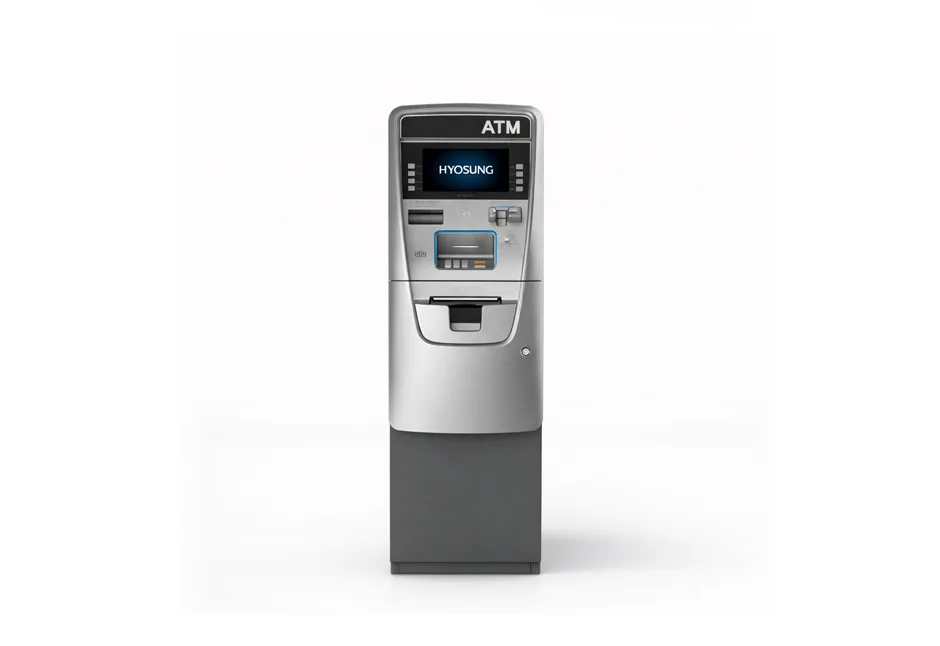
To load an ATM: prepare your bills by sorting and removing damaged notes, unlock and open the vault, check and empty the reject bin, remove the cassette, load your bills face-down and nose-first in the correct orientation, reinsert the cassette, close and lock the vault, then update the bill count in the settlement menu. Finish with a test transaction to confirm the machine is communicating with the network.
Loading an ATM for the first time feels more complicated than it actually is. Once you have done it two or three times, the whole process takes under 10 minutes. The reason it seems intimidating at first is that the consequences of doing it wrong, a bill jam, a cassette count mismatch, or a machine that goes out of service, are visible and immediate. This guide walks through every step in order, explains why each step matters, and covers the mistakes that cause most of the problems new operators run into.
The core process is the same across Hyosung, Genmega, Triton, and Hantle machines. Where specific menus or button sequences differ between brands, those differences are noted inline.
Under 10 min
Typical time to load a retail ATM once you have done it a few times
$20,000 max
Maximum load for a standard 1,000-note cassette using $20 bills
200-note reject bin
Capacity of most ATM reject bins. Check and empty it every time you load.
Bill count only
Always enter number of bills, not dollar amount, in the settlement menu
What You Need Before You Start
Get everything together before you go to the ATM location. Arriving without one of these items means a wasted trip or a machine that stays out of service longer than necessary.
- Your vault key and cassette key: Most ATMs use two separate keys. One opens the vault door, one locks and unlocks the cassette. Keep both on the same keyring. Losing either requires contacting your machine’s manufacturer or dealer, which takes time and proof of ownership.
- Your operator password: You need this to access the settlement menu and update the bill count. The default passwords on most machines are simple (123456 or similar), but you should have changed yours from the factory default during initial setup. Know what yours is before you leave.
- Your cash, counted and sorted: Count your bills before leaving the bank or office. Know exactly how many bills you are bringing. You will enter this number in the machine’s settlement menu, and if it does not match what is physically in the cassette, your count will be off and the machine may show an out-of-service error when it runs low.
- A count sheet or phone note: Write down the starting cassette count, the amount you are adding, and the expected total. This becomes your reconciliation record. Simple as it sounds, most cassette count mismatches happen because operators loaded by memory instead of documentation.
- Receipt paper (if running low): Check your remote monitoring dashboard or the last transaction receipt. If the paper looks faded at the bottom edge, bring a new roll. A machine that cannot print receipts will often go out of service or decline transactions.
Step 1: Prepare Your Bills
This step happens before you get to the ATM, not at the machine. Inspect and sort your bills at home, in your car, or at the bank. Doing it publicly at the ATM location is a security risk.
The ATM dispenser uses optical sensors and thickness detectors to count each bill as it moves through the mechanism. It will reject any bill that is torn, missing a corner, heavily wrinkled, folded, taped, or stuck to another bill. When the sensor detects something off, it diverts that bill to the reject bin rather than dispensing it. A high volume of rejects during a single load usually means the cash quality is poor, and those bills will keep causing problems every time they cycle through the machine.
Go through your stack bill by bill and remove anything that is visibly worn, wrinkled, or damaged. Set those aside to exchange at your bank. What remains should be clean, flat, and in good condition. If you are working with brand new bills from the bank, give them a gentle shuffle before loading. Crisp new bills have a tendency to stick together, which causes the dispenser to pick two at a time and send both to the reject bin instead of dispensing one to the customer.
Many bank branches will go through your cash for you if you call ahead and ask. Some branches will also swap out worn or damaged bills at no charge. If you are near a branch that will do this, it is worth the stop. Clean cash means fewer rejects, fewer jams, and fewer service calls.
Step 2: Get the Current Bill Count Before You Open Anything
Before unlocking the vault, check what the machine currently shows as the cassette count. You do this through the operator menu.
On most Hyosung and Genmega machines, the path is: operator menu > settlement. On the settlement screen, you will see the current number of bills the machine believes are in the cassette. Write this number down. You will use it in a moment to calculate your total and to verify everything reconciles after loading.
If the current count shows 0 but you know the machine had cash in it, do not panic. This can happen when the machine resets or loses power. It does not mean the cash is gone. The physical cash is still in the cassette. You will account for all of it when you update the count at the end of the loading process.
Step 3: Access the Vault
Stand at the front of the machine facing the screen. The vault access panel is typically at the lower front of the machine, sometimes behind the customer-facing fascia panel. On some models with a rear-service configuration, access is from behind the wall.
If your machine has an electronic lock (which most modern retail ATMs do), enter your vault code on the keypad on the lock itself or on the ATM’s main keypad. You will typically hear one or two beeps confirming the code was accepted. If your machine still uses a dial lock, dial your combination as you would a standard combination lock.
After the code is accepted, turn the vault handle and pull the door open. The door opens toward you. Do not force it. If the handle resists after entering the correct code, try re-entering the code. Electronic locks have a slight delay between code acceptance and the latch releasing.
ATM vaults are dark. If your machine has a vault light (Hyosung Force has one built in; others do not), it will illuminate when the door opens. On machines without a vault light, use a small flashlight or your phone’s flashlight. Do not work blind inside the vault. Misloading the cassette or missing a jammed bill in the dispenser because you could not see clearly causes the exact problems this whole process is designed to prevent.
Step 4: Check and Empty the Reject Bin
The reject bin sits directly above the cash cassette inside the vault. It collects every bill the dispenser pulled from the cassette but decided not to send to the customer: bills that were too thick (two stuck together), too thin (torn or damaged), or flagged by the optical sensor for any other reason.
Most reject bins hold up to 200 notes. Pull out any bills that have accumulated there and set them aside. Count them. These are bills you paid for that have not been dispensed, so they need to be accounted for. Either include them in your count for the current load (if they are in good enough condition to reuse) or take them with you and exchange them at the bank.
Do not put reject bin bills back into the cassette unless you have inspected and cleaned them first. The reason they ended up in the reject bin is that the dispenser could not handle them. If you load them back without fixing the underlying issue, they will reject again and sit in the bin again, doing nothing.
A full reject bin is a symptom, not just a maintenance item. If you open the vault and find 50 or more bills in the reject bin, that is abnormal and indicates either a cash quality problem or a dispenser issue. Normal reject bin accumulation between loads at a healthy machine is single digits to low double digits. Investigate the cause before loading more cash.
Step 5: Remove and Load the Cassette
The cassette is the removable container that holds your cash inside the vault. It has a handle on top and a release mechanism that varies slightly by machine. On most Hyosung and Genmega retail ATMs, you grip the handle with one hand and support the bottom of the cassette with the other, then pull it out toward you.
Opening the Cassette
Most removable cassettes require the cassette key to open. Insert your cassette key into the round lock on the cassette body, turn it, and the cassette will open to reveal the bill stack and the spring-loaded plate that holds the bills against the dispenser rollers.
Loading Your Bills
Bill orientation is the part that trips up new operators most often. Get it wrong and the machine either jams immediately or rejects every bill it tries to dispense. The correct orientation for most retail ATMs:
- Face down: Bills should be loaded with the printed side facing down.
- Nose first: The short edge of the bill (the “nose”) goes in first, toward the dispenser mechanism. The long edge faces you as you load.
- All bills facing the same direction: Every bill in the stack must face the same way. Mixed orientation causes jams and rejects.
If you are unsure about the correct orientation for your specific machine, look at the last few bills remaining in the cassette before you empty it. They will be in the correct orientation for that machine. Match that orientation when loading your new bills.
Compress the spring-loaded tensioner plate before loading. This plate pushes against the bill stack to maintain pressure against the dispenser rollers. If you load bills without compressing it first, the cassette will be overfilled and the tension will be uneven, causing feed errors. Press the tensioner down or back (depending on your cassette design), load your bills in a neat even stack, and release the tensioner to hold them in place.
Load your bills in a single denomination. Most retail ATMs are configured for a single denomination, typically $20 bills. Do not mix denominations in the same cassette unless your machine has been specifically configured and programmed for multi-denomination dispensing. Loading mixed denominations in a single-denomination cassette will cause the machine to dispense incorrect amounts.
Do not overfill the cassette. The standard 1,000-note cassette holds exactly 1,000 bills. Compressing more than that into the cassette damages the bills, jams the dispenser, and can physically damage the tensioner spring over time. If you have more cash to load than the cassette holds, hold the rest in your pocket and plan a top-up load sooner.
Closing and Reinserting the Cassette
Close the cassette body and lock it with the cassette key. Then slide the cassette back into the dispenser housing inside the vault. You should feel a definite click when it seats correctly. If it does not click into place, remove it and try again. A cassette that is not fully seated will cause the machine to show a cassette-not-detected error and go out of service.
Step 6: Close and Lock the Vault
Close the vault door firmly. Turn the handle back to its locked position. On machines with an electronic lock, the lock re-engages automatically when the door is closed. On machines with a dial lock, re-spin the dial at least one full rotation to scramble the combination after closing.
Test the door by pulling on it before walking away. A vault door that appears closed but is not fully latched is a security liability. If the door will not fully close, check for any obstruction inside, a bill that fell during loading, the cassette not seated correctly, or anything blocking the door frame.
Step 7: Update the Bill Count in the Settlement Menu
This is the step most new operators underestimate, and it is where most cassette count errors originate. The machine does not know how many bills you just loaded. You have to tell it. If you skip this step or enter the wrong number, the machine’s internal count will not match physical reality, which causes the low-cash alert to trigger at the wrong time and creates reconciliation headaches when you pull reports.
Navigate to the operator menu using your operator password. The path on most machines:
| Brand | Menu Path | Function to Use |
|---|---|---|
| Hyosung (Halo II, Force, 2700CE) | Operator Menu > Settlement | Add Cassette (adds to existing count) or Set Cassette (replaces existing count with a new total) |
| Genmega (G2500, Onyx, NOVA) | Operator Menu > Settlement | Add Cassette or Set Cassette. Same logic as Hyosung. |
| Triton (ARGO, RL5000) | Operator Menu > Replenish | Enter total bill count and press Totals Correct. A receipt prints confirming the count. |
| Most other brands | Operator Menu > Settlement or Replenish | Look for Add Cassette, Set Cassette, or Replenish function. Enter bill count when prompted. |
Add Cassette vs. Set Cassette: Which to Use
Use Add Cassette when you are topping up the cassette without removing and fully reloading it. You enter only the number of bills you just added. The machine adds that number to its existing count.
Example: The machine shows 80 bills remaining. You add 400 bills to the cassette without removing the existing 80 first. You press Add Cassette, enter 400, and the machine’s new count is 480.
Use Set Cassette when you have completely removed the old cash, emptied the cassette, and loaded a fresh batch from scratch. You enter the total number of bills now in the cassette. This replaces whatever number the machine had before.
Example: You removed all remaining bills, counted them (80 bills), added your new cash (400 bills), confirmed the total in the cassette is 480, and press Set Cassette and enter 480.
Always enter the number of bills, not the dollar amount. The machine counts in notes, not dollars. If you enter 400 when you mean $400 worth of $20 bills (which is actually 20 bills), your cassette count will show 400 bills and the low-cash alert will not trigger until the machine thinks it has gone through 380 more transactions than it actually has. This is one of the most common and easiest errors to make.
Step 8: Run a Test Transaction
Do not leave the location until you have confirmed the machine is communicating with the processing network. The test costs you nothing and takes 30 seconds.
Use your own debit card at the machine as if you were a customer. When the machine asks for your PIN, enter an incorrect number on purpose, something like 1111 or 9999. Continue through the transaction and request a $20 withdrawal. The machine will attempt to authorize the transaction with the network. Since the PIN is wrong, the network will decline and the machine will display an “invalid PIN” or “transaction declined” message.
That declined message is confirmation that your machine is online, talking to the processor, and ready for real customer transactions. What you are NOT testing is whether the machine can dispense cash, but that is acceptable here. You do not want to dispense cash just to test connectivity. The network communication is what matters.
If instead the machine shows an error like “host not responding,” “no network connection,” or “communication error,” the machine is not reaching the processor. Check that the ethernet cable is plugged in, or that the wireless modem is powered and connected. If the connection looks fine but the error persists, call your ATM processor’s technical support line before leaving.
How Much Cash to Load: Getting the Amount Right
There is no universal right answer because it depends on your location’s transaction volume. But here are the practical rules experienced operators use:
| Location Type | Typical Load Amount | Reload Frequency |
|---|---|---|
| New machine, unknown volume | $2,000 to $3,000 | Check after the first week to establish baseline |
| Low-volume location (bar, small retail) | $2,000 to $5,000 | Every 2 to 4 weeks |
| Medium-volume location (hotel, dispensary) | $5,000 to $10,000 | Weekly or every 10 days |
| High-volume location (nightclub, festival, casino) | $10,000 to $20,000 | Nightly or every 2 to 3 days |
| First-of-month spike locations | Load to full capacity 2 to 3 days before the 1st | Monitor daily the first week of each month |
The goal is matching your load amount to your transaction pattern. Too little cash means the machine runs empty and customers leave. Too much cash means capital sitting idle in the machine earning nothing. Most operators find their rhythm within the first two to three months and start loading with confidence rather than guessing.
Your remote monitoring dashboard will show you the current cassette level in real time. Set a low-cash alert at 150 to 200 notes so you get a notification with enough lead time to schedule a reload before the machine hits zero.
The Full Loading Checklist at a Glance
-
☑Bills counted, sorted, and damaged notes removed, done at home or the bank, not at the ATM
-
☑New crisp bills shuffled slightly to prevent multiple-picks
-
☑Current bill count noted from the settlement menu before opening the vault
-
☑Vault opened with code and key
-
☑Reject bin checked and emptied, bills counted and set aside
-
☑Cassette removed and opened with cassette key
-
☑Bills loaded face-down, nose-first, all same direction
-
☑Cassette closed, locked, and reinserted until it clicks
-
☑Vault door closed, handle locked, door tested by pulling
-
☑Settlement menu opened, bill count updated using Add Cassette or Set Cassette, number of bills entered, not dollar amount
-
☑Test transaction run with wrong PIN to confirm network connectivity
-
☑Load documented, date, bills added, total count, reject bin count, who loaded it
Common Problems and What They Mean
| Problem | Most Likely Cause | Fix |
|---|---|---|
| Machine shows “out of service” immediately after loading | Cassette not fully seated, or bill count not updated in the settlement menu | Open vault, remove and reinsert cassette until it clicks. Then go to settlement menu and update the bill count. |
| Bill jam during first few transactions after loading | Damaged bills, mixed bill orientation, or overfilled cassette | Open vault, remove cassette, check bill orientation and remove any damaged notes. Reload carefully. Do not overfill. |
| High reject rate (machine keeps rejecting bills into reject bin) | Poor cash quality or new crisp bills sticking together | Remove bills, shuffle them, exchange worn or damaged notes at the bank, reload. If problem persists with good cash, CDU may need cleaning or service. |
| Machine shows “F0001 Current Number of Bills is 0” | Bill count not updated after loading (Hyosung error code) | Go to Operator Menu > Settlement > Add Cassette and enter the bill count. |
| Test transaction shows “communication error” or “host not responding” | No network connection: ethernet unplugged or wireless modem not connected | Check ethernet cable. If wireless, verify modem has signal bars. Restart the modem if needed. Contact your processor if issue persists. |
| Low-cash alert fires much earlier than expected | Bill count entered was too low, or the wrong function was used (Add vs. Set) | Open the settlement menu and check the current bill count. If it does not match physical reality, use Set Cassette to enter the correct total. |
Security During Cash Loading
A few practices that experienced operators follow on every load:
- Never count or prepare cash at the machine publicly. Counting $5,000 in a store aisle where customers can watch is an invitation for problems. Do this work before you arrive.
- Load during business hours when others are present. Do not load a cash machine alone in an empty parking lot at 11 PM. Most independent ATMs have a scheduled maintenance window that aligns with business hours for this reason.
- Change your vault code from the factory default. Factory defaults like 1234 or 000000 are known to anyone who has read the machine’s manual. If you have not changed yours, do it before the next load.
- Keep a loading log. Document every load: date, time, bills added, total count, person who loaded it. This is your first defense in any dispute about cash discrepancies and is also useful for spotting unusual patterns in your reject bin or transaction counts.
- Vary your schedule when possible. If you always load on Tuesday mornings at 10 AM, a predictable pattern is a security risk. Vary the day and time when your volume allows it.
Frequently Asked Questions
How do you load an ATM machine?
You prepare your bills (count, sort, remove damaged notes), open the vault with the code and key, check and empty the reject bin, remove the cassette, load your bills face-down and nose-first, reinsert the cassette until it clicks into place, close and lock the vault, update the bill count in the operator menu’s settlement section, and run a test transaction to confirm the machine is online.
How much cash do you put in an ATM?
It depends on transaction volume. New machines at unknown locations are typically started with $2,000 to $3,000 to establish a baseline before loading more. Low-volume locations run on $2,000 to $5,000 and reload every few weeks. High-volume locations may need $10,000 to $20,000 and reload every few days. A standard 1,000-note cassette in $20 bills holds $20,000 maximum.
How often do you need to load an ATM?
As often as your transaction volume requires. A machine doing 50 transactions per month at an average of $60 per withdrawal needs roughly $3,000 per month in cash, which means one load per month at most. A machine doing 300 transactions at a high-traffic nightclub may need $18,000 or more per month, which could mean loading multiple times per week. Your remote monitoring dashboard tracks the cassette level in real time. Set a low-cash alert at 150 to 200 notes to get notified before the machine runs empty.
What bills can you put in an ATM?
Most retail ATMs are configured for a single denomination, almost always $20 bills. The machine’s software and dispenser mechanics are set up around one bill size and denomination per cassette. Do not mix denominations unless your machine has been explicitly configured and programmed for multi-denomination dispensing. Loading mixed denominations in a single-denomination cassette causes the machine to dispense wrong amounts and will eventually cause errors and jams.
What is the reject bin in an ATM?
The reject bin is a small tray directly above the cash cassette inside the vault. When the ATM’s dispenser pulls a bill from the cassette that its sensors detect as damaged, too thick (two bills stuck together), or otherwise unacceptable, it diverts that bill to the reject bin instead of dispensing it to the customer. Check and empty the reject bin every time you load the machine. Most retail ATM reject bins hold up to 200 notes.
What happens if you enter the wrong bill count?
The machine’s electronic cassette count will not match the physical cash in the cassette. If you entered too high a count, the machine will continue trying to dispense after the cassette is empty, causing a “no notes” error that takes the machine out of service. If you entered too low a count, the low-cash alert will fire early and your reconciliation reports will not balance. In either case, correct it by going to the settlement menu and using Set Cassette to enter the correct current count.
Can you load an ATM with $50 or $100 bills?
Only if the machine is specifically configured for that denomination. Most retail ATMs, the kind found in convenience stores, bars, and hotels, are set up exclusively for $20 bills. Some higher-volume or financial institution machines support $50s or $100s in separate cassettes. Check your machine’s programming with your ATM processor before attempting to load any denomination other than $20.
The Bottom Line
Loading an ATM is straightforward once you understand the three things that actually matter: clean cash in the right orientation, an accurate bill count in the settlement menu, and a confirmed network connection before you leave. Everything else in the process is just the physical steps to get there.
The operators who have the fewest problems are the ones who follow a consistent routine every time: same pre-load preparation, same sequence inside the vault, same settlement menu update, same test transaction at the end. No shortcuts. The 10-minute investment in doing it right prevents the service call that costs you an hour and the revenue you lose while the machine is down.
If you are just getting started with an ATM at your location and have not set up your remote monitoring alerts yet, that is the next thing to do. A low-cash alert at 150 to 200 notes gives you enough lead time to schedule a reload without rushing or running empty.
Explore more: ATM machines for sale, how to start an ATM business, ATM parts and supplies
Get the ATM industry update
New guides, pricing news, and operator tips from someone who actually runs machines. Free every week, unsubscribe any time.